Have you ever wondered what powers Jira behind the scenes? Understanding the Jira tech stack can give you a clear picture of how this popular tool manages projects so smoothly.
Whether you’re a developer, project manager, or just curious, knowing the technology behind Jira can help you use it smarter and even make better decisions for your own projects. You’ll discover the key components that make Jira tick and why they matter to you.
Keep reading to unlock the secrets of Jira’s powerful tech stack.
Jira At A Glance
Jira is a popular tool for project management and issue tracking. It helps teams plan, track, and release software effectively. Many companies trust Jira to organize their work and improve collaboration.
Understanding Jira’s core features helps grasp its role in software development. The platform supports agile methods like Scrum and Kanban. It offers customizable workflows to fit different project needs.
What Is Jira?
Jira is software designed to track tasks and bugs. It allows teams to create, assign, and prioritize work items. The tool provides clear visibility into project progress and team performance.
Key Features Of Jira
- Issue and project tracking
- Custom workflows
- Agile boards for Scrum and Kanban
- Detailed reporting and dashboards
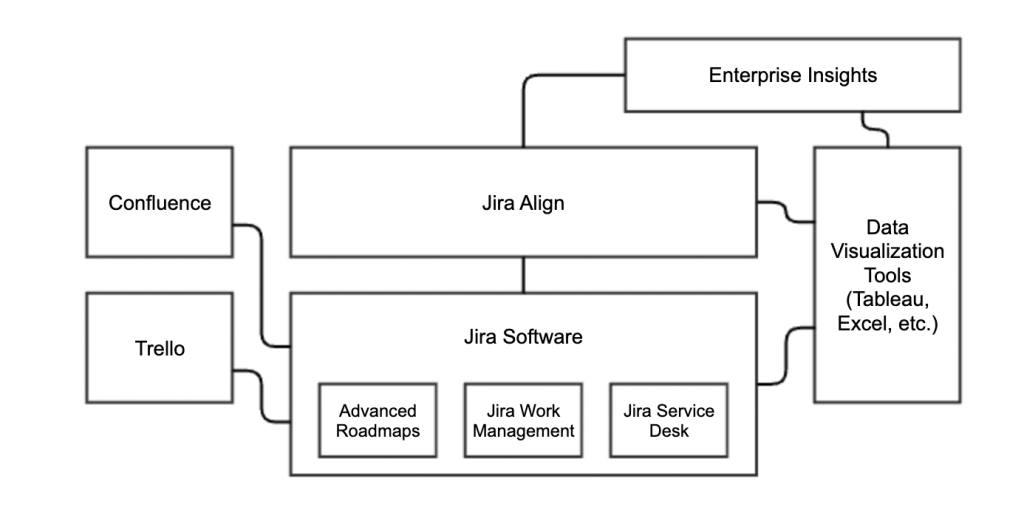
- Integration with other tools
Who Uses Jira?
Jira is popular among software developers, testers, and project managers. It suits teams of all sizes, from startups to large enterprises. Non-technical teams also use Jira for task management.
Credit: manitechy.medium.com
Core Technologies Behind Jira
Understanding the core technologies behind Jira gives you a clear picture of how this powerful tool functions smoothly and efficiently. These technologies shape Jira’s performance, flexibility, and scalability, allowing teams like yours to manage projects effortlessly. Let’s break down the main components that form the backbone of Jira’s tech stack.
Programming Languages
Jira primarily runs on Java, a language known for its stability and cross-platform capabilities. Java allows Jira to handle complex workflows and large-scale project management without slowing down.
Alongside Java, JavaScript plays a key role in creating interactive user interfaces. This combination ensures that your experience with Jira is both responsive and dynamic.
Frameworks And Libraries
Jira uses the Spring Framework extensively to build its backend services. Spring helps manage dependencies and simplifies the development of secure and scalable applications.
On the frontend, Jira employs React, a popular JavaScript library, to deliver fast and responsive UI components. This means you get smooth navigation and real-time updates as you work.
Database Systems
Jira stores its data in relational databases like PostgreSQL and MySQL. These databases are reliable and allow for efficient data retrieval, which keeps your project information accessible and safe.
Choosing such robust databases ensures that no matter how many issues or projects you handle, Jira maintains quick response times and data integrity.
Jira’s Frontend Architecture
Jira’s frontend architecture plays a crucial role in delivering a smooth and efficient user experience. It is designed to handle complex project management tasks while keeping the interface intuitive and responsive. Understanding its frontend setup can help you appreciate how Jira balances power and usability.
User Interface Tools
The frontend of Jira relies on a mix of modern JavaScript frameworks and libraries. React is a key player here, providing a component-based approach that makes the interface modular and easy to maintain. This structure allows developers to update or add features without disrupting the whole system.
Alongside React, Jira uses Atlaskit, a design system built specifically to maintain consistency in UI elements. This toolkit offers pre-designed components like buttons, forms, and modals that follow Atlassian’s design guidelines. Using these tools, Jira’s frontend remains visually cohesive and user-friendly across different modules.
Responsive Design Techniques
Jira’s frontend adapts seamlessly to various screen sizes, from desktops to tablets and smartphones. The architecture incorporates flexible grid layouts and media queries to ensure content adjusts correctly without breaking the layout. This responsiveness guarantees that your workflow isn’t interrupted, no matter what device you use.
Moreover, Jira optimizes load times and interaction speeds by lazy loading components and minimizing unnecessary scripts on smaller screens. This approach not only improves performance but also enhances accessibility. Have you noticed how Jira keeps essential functions easily accessible even on a mobile device? That’s the power of its responsive design.
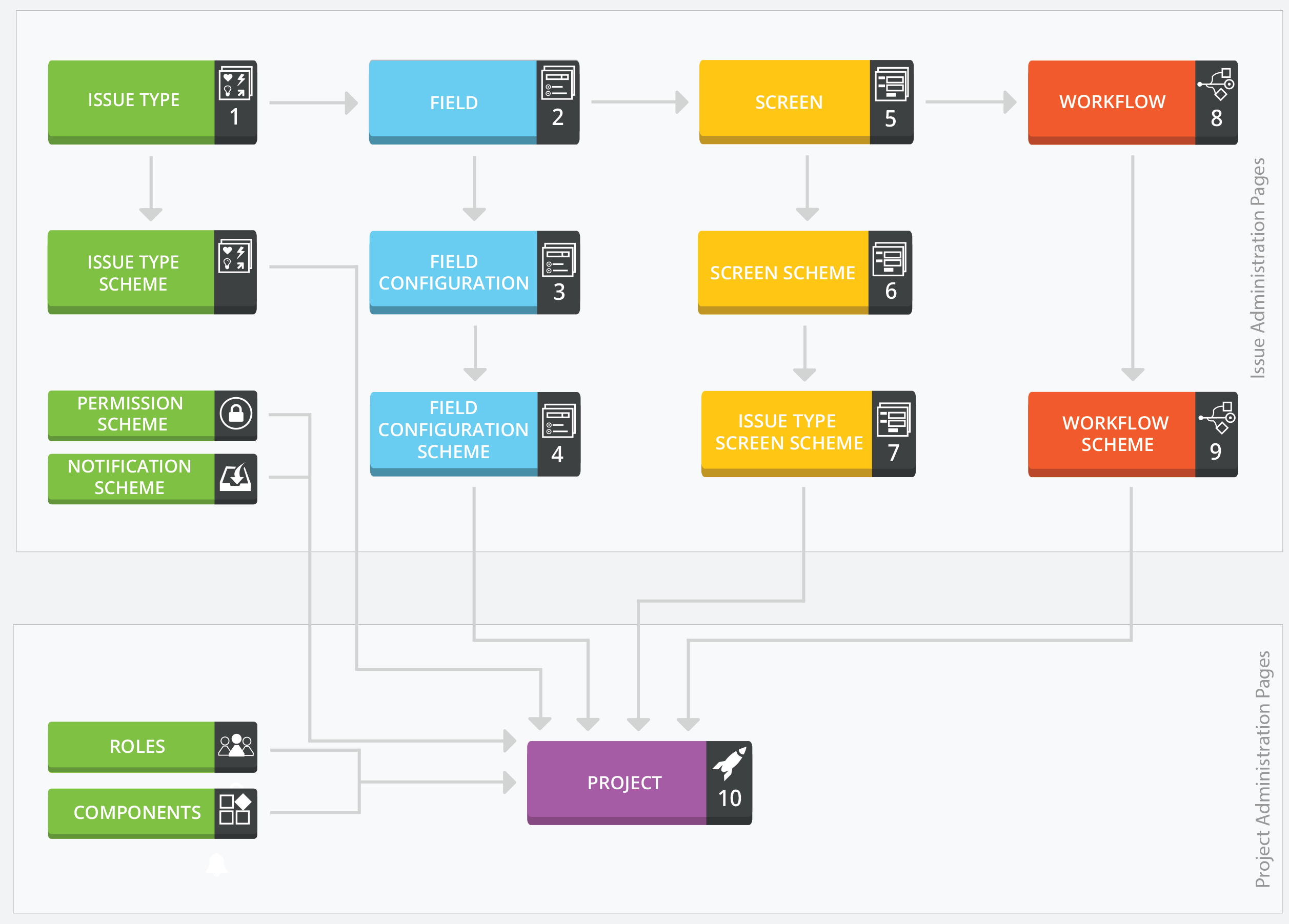
Credit: www.inflectra.com
Backend Infrastructure
The backend infrastructure of Jira is the foundation that supports its powerful project management features. It ensures data is processed quickly, securely, and reliably, so you can focus on managing tasks without worrying about system hiccups. Understanding this infrastructure helps you appreciate how Jira handles complex workflows and integrates with other tools.
Server Environment
Jira’s server environment runs primarily on Java, using the Apache Tomcat server to handle web requests efficiently. This setup allows Jira to be platform-independent, running smoothly on Linux, Windows, or macOS. The server environment is optimized for stability and scalability, so whether your team is small or enterprise-sized, Jira adapts without slowing down.
One practical insight is how Jira manages memory and caching to speed up response times. It uses a combination of in-memory caching and database optimizations to reduce load times. Have you ever noticed Jira’s quick page loads even with heavy project data? That’s the backend environment working behind the scenes.
Api And Integration Layers
Jira offers a robust set of REST APIs that let you connect your workflow with countless external tools. These APIs allow you to automate tasks, pull reports, or sync data with other platforms like Confluence or Bitbucket. The flexibility here means you can tailor Jira to fit your team’s unique needs without being stuck in a rigid system.
Integration layers are designed to handle high volumes of requests without breaking. This means your integrations won’t slow down your Jira experience, even during peak usage. Have you tried connecting Jira to your communication tools? The smooth data flow you experience is thanks to these well-built API layers.
Data Management And Storage
Data management and storage form the backbone of Jira’s technology stack. This area ensures that all project data, user information, and configuration settings are stored securely and accessed quickly. Efficient data handling keeps Jira responsive and reliable for users worldwide.
Database Choices
Jira supports multiple database systems to store its data. Commonly used databases include PostgreSQL, MySQL, Oracle, and Microsoft SQL Server. These databases handle structured data like issues, projects, users, and workflows.
Each database offers unique benefits. PostgreSQL is popular for its stability and advanced features. MySQL is favored for speed and ease of use. Oracle and SQL Server suit larger enterprises needing robust support.
Jira’s flexible database support allows organizations to pick the best fit. It helps with scaling and managing large volumes of data efficiently.
Caching Mechanisms
Caching plays a key role in speeding up Jira’s performance. It stores frequently accessed data in memory to reduce database load. This approach lowers response times and improves user experience.
Jira uses in-memory caches to hold data like user sessions, permissions, and issue details. These caches update regularly to keep data fresh and accurate.
Effective caching reduces delays during high traffic periods. It helps Jira stay fast even with many users accessing the system simultaneously.
Security Features In Jira
Jira offers strong security features to protect project data and user information. These features help companies keep their workflows safe and reliable. Security in Jira covers how users access the system and how data remains secure within it. Understanding these features is key to managing projects securely.
Authentication Methods
Jira uses various ways to verify user identities before granting access. It supports single sign-on (SSO), allowing users to log in with one set of credentials. Multi-factor authentication (MFA) adds an extra layer of security by requiring a second form of verification. Password policies enforce rules like length and complexity to prevent weak passwords. These methods reduce the risk of unauthorized access.
Data Protection Strategies
Jira protects data both while it moves and when it rests. Data encryption secures information during transmission using SSL/TLS protocols. At rest, Jira encrypts sensitive data in databases and backups. Regular backups ensure data can be restored if lost or corrupted. Access controls restrict who can view or edit project information. Audit logs track user actions for transparency and troubleshooting.
Development And Deployment Tools
Development and deployment tools are vital parts of the Jira tech stack. They help teams build, test, and release software efficiently. These tools improve collaboration, automate tasks, and reduce errors. Using the right tools speeds up the entire development process.
Continuous Integration
Continuous Integration (CI) is a key practice in software development. It allows developers to merge code changes often. CI tools automatically build and test the new code. This helps catch problems early. Popular CI tools used with Jira include Jenkins and Bamboo. They connect with Jira to track build status and issues. This integration keeps the team updated on progress and bugs.
Version Control Systems
Version Control Systems (VCS) manage changes to source code. They keep a history of every change made by developers. Git is the most common VCS paired with Jira. It supports branching and merging, which helps manage multiple development efforts. Jira links with Git to show commit details inside issues. This gives clear insight into code changes related to tasks. Using VCS with Jira improves code quality and team coordination.
Extensibility And Plugins
Jira is more than just a project management tool. Its extensibility allows users to tailor the platform to specific needs. Plugins enhance functionality and improve workflows. These additions make Jira flexible for many industries and teams.
Plugin Framework
The Jira plugin framework supports custom add-ons. Developers can create plugins using APIs and SDKs provided by Atlassian. This system allows integration of new features directly into the Jira interface. It ensures plugins work smoothly with core Jira functions. The framework supports both server and cloud versions of Jira. This flexibility helps teams adapt Jira without heavy coding.
Marketplace Ecosystem
The Atlassian Marketplace offers thousands of Jira plugins. Users can browse tools for reporting, automation, and design. Each plugin comes with reviews and ratings for easy selection. Many plugins are free, while others require purchase. The marketplace also supports regular updates to keep plugins compatible. It connects users with developers for support and feedback. This ecosystem helps teams find solutions that fit their unique workflows.
Cloud Vs Server Tech Differences
Choosing between Jira Cloud and Server often comes down to understanding the technical differences that impact your team’s workflow and infrastructure. These differences influence how Jira integrates with your existing systems, how it performs under load, and how much control you retain. Let’s break down some key distinctions so you can make a more informed decision.
Architecture Variations
Jira Cloud runs on Atlassian’s infrastructure, meaning all your data and processes live on their servers. This setup removes the need for you to manage hardware or software updates, which can save time but limits customization options.
On the other hand, Jira Server is hosted on your own infrastructure or a private cloud. This gives you full control over the environment, letting you tweak settings, install custom plugins, and control data storage. However, it also means you’re responsible for maintenance, backups, and scaling.
Think about your team’s technical capacity. Do you have the resources to manage a server environment, or is it better to let Atlassian handle it? Your choice here affects not only control but also your security and compliance strategy.
Performance Considerations
Performance can vary significantly between Cloud and Server setups. Jira Cloud benefits from Atlassian’s global data centers, which can distribute load and offer better uptime for geographically dispersed teams.
However, if your team is localized and your workflows involve heavy data processing or custom scripts, a Jira Server might offer faster response times. You can optimize the server hardware specifically for your needs, something you can’t do with Cloud.
Have you noticed lag when performing complex operations in Jira Cloud? This could be a sign to evaluate if a Server deployment fits your workload better. Monitoring your team’s day-to-day experience will guide you toward the best balance between convenience and speed.
Future Trends In Jira Tech Stack
The future of the Jira tech stack holds exciting possibilities. It aims to improve project management and user experience. Developers focus on making the platform faster and easier to use. New tools and features will support agile teams better.
Advances in technology will shape Jira’s growth. Integration with cutting-edge tools and automation will play a big role. Users can expect smarter workflows and better collaboration.
Emerging Technologies
Artificial intelligence is becoming part of Jira’s tech stack. AI helps predict project risks and suggests task priorities. Machine learning improves data analysis and reporting features.
Cloud computing continues to expand Jira’s capabilities. It offers better scalability and access from anywhere. Serverless architectures and containerization boost performance and reliability.
Integration with Internet of Things (IoT) devices is also emerging. This supports real-time updates and monitoring for complex projects.
Planned Enhancements
Jira developers plan to enhance user interfaces for simplicity. Customizable dashboards and drag-and-drop features are in progress. These will help users focus on key tasks quickly.
Improved automation tools will reduce manual work. Users can create more complex workflows with less effort. Notifications and alerts will become more intelligent and context-aware.
Security enhancements are a priority. Stronger encryption and advanced access controls will protect project data better. Compliance with global standards is being improved.
Credit: onna.com
Frequently Asked Questions
What Is The Tech Stack Of Jira?
Jira’s tech stack primarily includes Java, PostgreSQL, and Tomcat for server-side operations. On the client side, it uses HTML, CSS, and JavaScript frameworks like React. This combination allows Jira to deliver robust project management features while ensuring scalability and performance across various environments.
How Does Jira Use Java?
Java is used as the backbone of Jira’s server-side architecture. It offers reliability, security, and portability across different platforms. Java’s extensive libraries and frameworks enable Jira to support complex functionalities and integrations. This makes Jira adaptable for diverse enterprise environments and enhances its performance.
Why Does Jira Use Postgresql?
PostgreSQL is chosen for Jira due to its reliability and advanced features. As an open-source database, PostgreSQL offers flexibility and robust performance for managing large datasets. It ensures data integrity and supports complex queries, making it ideal for Jira’s needs in project management software.
What Frameworks Does Jira Utilize?
Jira utilizes frameworks like React for building responsive user interfaces. React helps in creating dynamic web applications with efficient rendering. It allows Jira to offer seamless user experiences and maintain high performance. This choice supports rapid development and scalability of the platform.
Conclusion
Jira’s tech stack supports smooth project tracking and team work. It uses strong tools like Java, React, and AWS for speed and reliability. Developers and managers find it easy to use and customize. This makes Jira popular in many industries.
Understanding its tech stack helps you see why it works well. It fits different project needs and grows with your team. Jira stays a solid choice for managing tasks and projects. Simple, flexible, and reliable—that’s the power behind Jira’s tech stack.