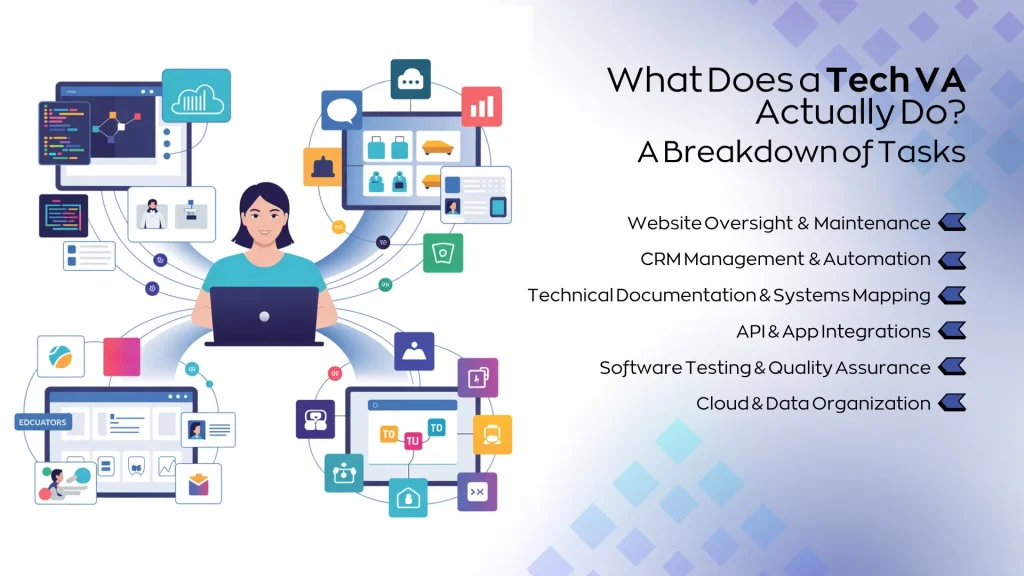
Have you ever wondered what an IT tech really does behind the scenes? If you rely on your computer, smartphone, or internet every day, understanding this role can make a big difference for you.
An IT tech is the person who keeps your devices running smoothly, solves frustrating tech problems, and helps you stay connected. Curious to know exactly how they do it and why their work matters to you? Keep reading, and you’ll discover the key ways IT techs make your digital life easier and more reliable.
Core It Tech Responsibilities
Core IT tech responsibilities cover many key tasks. These duties keep computer systems and networks running smoothly. IT techs ensure devices work correctly and fix problems fast. Their role supports both daily operations and long-term business goals.
System Installation And Maintenance
IT techs install software and hardware. They set up new computers, printers, and servers. Regular maintenance helps avoid system failures. Updating software and cleaning hardware keeps everything efficient. They also back up important data to prevent loss.
Network Management
Managing networks is a vital task for IT techs. They configure routers, switches, and firewalls. Monitoring network performance helps avoid slowdowns. IT techs ensure users have secure and reliable access. They also add new devices and troubleshoot connection issues.
Troubleshooting And Support
IT techs solve technical problems quickly. They respond to user issues with hardware or software. Diagnosing problems helps find the right solutions. Support can include helping with passwords, software errors, or device failures. Clear communication makes it easier for users to understand.
Security Implementation
Protecting data and systems is a top priority. IT techs install antivirus and firewall software. They set up user permissions and strong passwords. Regular security updates stop threats and attacks. Training users on safe practices reduces risks significantly.

Credit: www.linkedin.com
Essential It Skills
Essential IT skills form the backbone of what an IT tech does daily. These skills help you fix issues quickly, keep systems running smoothly, and support users effectively. Without them, even the simplest tech problem can turn into a major headache.
Hardware And Software Knowledge
Understanding hardware and software is key. You need to know how computers, servers, and networks operate. This means being comfortable with installing, configuring, and troubleshooting various devices and programs.
Think about the last time you replaced a faulty hard drive or updated software to fix a bug. That hands-on experience sharpens your ability to diagnose problems fast. If you don’t know the basics, you won’t know where to start.
Problem-solving Abilities
Every IT tech faces unexpected challenges. Your ability to analyze the problem and find a solution is critical. You should be ready to break down complex issues into manageable steps.
Imagine a user’s computer suddenly won’t connect to the internet. Do you check the router, the cables, or the software settings first? Your approach here can save hours of frustration.
Communication Skills
Being tech-savvy isn’t enough if you can’t explain solutions clearly. You often work with people who don’t speak “tech.” Your job is to translate technical jargon into simple terms.
Have you ever had to guide someone over the phone to fix a printer issue? Clear instructions can turn a stressful situation into a smooth fix. Good communication builds trust and makes your work more effective.
Continuous Learning
Technology changes fast. What you know today might be outdated next year. Staying curious and open to learning new tools and techniques keeps you relevant.
Do you set aside time regularly to explore new software or security updates? Those small efforts add up, making you a stronger IT professional and a valuable asset to your team.
Common It Tech Roles
IT tech roles cover a wide range of responsibilities that keep technology running smoothly in any organization. Each role targets specific areas like troubleshooting, managing networks, analyzing systems, or providing user support. Understanding these roles can help you decide which path fits your skills and interests best.
Help Desk Technician
A Help Desk Technician is often the first person you contact when facing technical issues. They diagnose and solve problems related to software, hardware, and network connections. If you enjoy problem-solving and working directly with people, this role offers plenty of hands-on experience.
They also guide users through step-by-step solutions, making complex tech easier to understand. Have you ever called tech support and felt relieved when someone explained the fix clearly? That’s the impact a good Help Desk Technician makes.
Network Administrator
Network Administrators design and maintain the networks that connect computers and devices. They ensure the network runs efficiently and securely, preventing downtime and cyber threats. If you like managing systems behind the scenes, this role might be your fit.
This job requires constant monitoring and updating of network equipment like routers and switches. Think about how frustrating it is when Wi-Fi suddenly drops—Network Administrators work hard to keep those interruptions to a minimum.
Systems Analyst
Systems Analysts study an organization’s IT needs and design solutions to improve efficiency. They analyze current systems, identify problems, and recommend upgrades or new software. If you have a knack for understanding both business and technology, this role could challenge and engage you.
They act as a bridge between users and developers, translating requirements into technical language. Ever wondered how new software seems perfectly tailored to a company’s workflow? A Systems Analyst often makes that happen.
Technical Support Specialist
Technical Support Specialists provide expert help on specific products or technologies. They handle advanced issues that go beyond basic troubleshooting. If you enjoy deep technical work and continuous learning, this position can keep you sharp.
They often work closely with engineers and developers to resolve complex problems. Have you faced a tricky tech issue that needed specialized knowledge? These specialists are the go-to experts for those challenges.
Career Path And Growth
The career path of an IT tech offers many chances to grow and learn. The field changes fast. It needs workers who keep up with new skills. Starting with basic roles, IT professionals can climb to advanced positions. Training and certifications help boost careers. Understanding industry trends guides good career choices.
Entry-level Positions
Many IT techs start as help desk support or IT assistants. These roles teach basic computer and network skills. Daily tasks include fixing simple problems and helping users. Entry jobs build a strong foundation for future roles. They also offer experience working with real technology and teams.
Certifications And Training
Certifications prove knowledge and skills to employers. Popular ones include CompTIA A+, Network+, and Microsoft Certified Professional. Training programs teach specific tools and systems. Online courses and workshops help IT techs stay current. Certifications open doors to better jobs and pay.
Advancement Opportunities
With experience, IT techs can move into system administration or network engineering. Some become cybersecurity specialists or cloud technicians. Leadership roles like IT manager or project coordinator are options. Growth depends on skills, experience, and certifications. Continuous learning supports career progress.
Industry Trends
- Cloud computing is growing fast, needing new skills.
- Cybersecurity is critical, creating many job openings.
- Automation tools reduce routine tasks for IT techs.
- Remote work increases demand for network and support roles.
Following these trends helps IT techs stay valuable and ready for change.
Work Environment And Challenges
The work environment of an IT tech is as dynamic as the field itself. You often find yourself navigating through fast-paced settings while managing multiple tech systems. Challenges come in many forms, testing your problem-solving skills and adaptability daily.
Typical Work Settings
IT techs work in various environments, from quiet office spaces to bustling server rooms. Some may find themselves on-site at client locations, fixing hardware or troubleshooting network issues. Remote work is also common, allowing you to support users across different time zones.
These settings require flexibility. You might spend part of your day sitting at a desk and another part climbing under desks to check cables or equipment. The diversity keeps the job interesting but demands physical and mental agility.
Common Challenges
One big challenge is dealing with unexpected system failures. When a network goes down or a server crashes, your skills are put to the test under pressure. You need to diagnose problems quickly and apply fixes without causing downtime.
Another difficulty is communicating technical details to non-technical users. You must translate complex jargon into simple language to help others understand issues and solutions. This balance between tech expertise and clear communication is crucial.
Balancing Multiple Tasks
Your day might include installing software, updating security protocols, and answering support tickets all at once. Juggling these tasks requires prioritization and time management skills. How do you decide which problem to tackle first when everything seems urgent?
Setting clear goals and using task management tools can help. Breaking down larger issues into smaller steps makes the workload less overwhelming. Staying organized is key to maintaining productivity and avoiding burnout.
Adapting To Technology Changes
Technology evolves rapidly, and IT techs must keep up to stay effective. You might need to learn new software, hardware, or security practices regularly. This constant learning can be challenging but also rewarding as it keeps your skills sharp.
Think about the last time you had to master a new tool or system quickly. That experience likely pushed you out of your comfort zone but improved your problem-solving abilities. Are you open to continuous learning, or do you find it overwhelming?

Credit: www.inetsoftwaresolutions.co.uk

Credit: www.instagram.com
Frequently Asked Questions
What Are The Primary Tasks Of An It Tech?
An IT tech installs, maintains, and repairs computer systems. They troubleshoot hardware and software issues to ensure smooth operations. They also support network connectivity and manage security protocols to protect data.
How Does An It Tech Support Daily Business Operations?
IT techs keep technology running efficiently in businesses. They fix technical problems quickly to minimize downtime. They also update software and hardware, ensuring systems meet company needs and security standards.
What Skills Are Essential For An It Tech?
An IT tech needs problem-solving skills, technical knowledge, and communication abilities. Familiarity with operating systems, networking, and cybersecurity is crucial. They must adapt to new technology trends and work well under pressure.
How Does An It Tech Handle Cybersecurity Threats?
IT techs identify and respond to security breaches promptly. They install firewalls, antivirus software, and perform regular system updates. They educate users on safe practices to prevent cyberattacks and data loss.
Conclusion
IT techs make technology work smoothly. They solve computer issues fast. Their skills keep systems running efficiently. From fixing bugs to installing software, they handle it all. Businesses rely on IT techs for seamless operations. They are crucial to maintaining digital security.
Their expertise ensures data stays safe. IT techs also help employees with tech tools. Understanding what IT techs do can improve workplace productivity. Their role is vital in modern tech environments. A career in IT offers growth and learning. Tech enthusiasts find it rewarding and challenging.
Embrace technology with skilled IT techs by your side.