What is a Tech Stack: Ultimate Guide to Build Your Perfect Setup
Have you ever wondered what powers your favorite apps and websites? The answer lies in the fascinating concept of a tech stack.
Imagine it as the secret sauce that makes digital platforms tick. But what exactly is a tech stack, and why should you care about it? Understanding this can unlock a world of possibilities, whether you’re a tech enthusiast, a budding developer, or simply curious about the digital world around you.
This article will demystify tech stacks, revealing how they shape the digital experiences you enjoy daily. Stick around, and you’ll gain insights that could transform your understanding of technology forever. Ready to dive in and discover the magic behind your screen? Let’s explore!
Tech Stack Basics
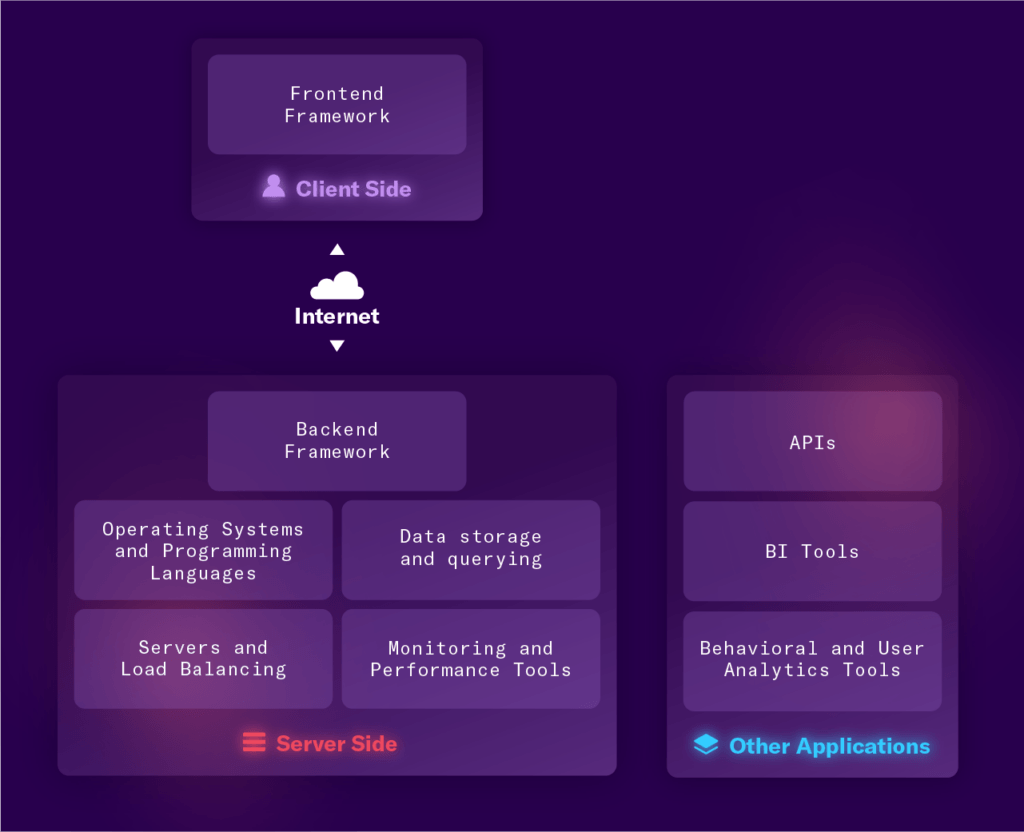
A tech stack is the set of tools and technologies used to build a software application. It includes programming languages, frameworks, and platforms. Understanding the basics helps you see how apps and websites work behind the scenes.
Every tech stack has key parts that work together. Each part has a specific job in creating a smooth user experience.
Core Components
The core components of a tech stack are the building blocks of any app or website. These usually include:
- Programming languages (like JavaScript, Python)
- Frameworks (such as React, Django)
- Libraries to add extra features
- Servers that run the app
- Databases that store information
Each component plays a unique role in development and maintenance.
Frontend Vs Backend
The frontend is what users see and interact with. It covers design, layout, and user experience. Common frontend tools include HTML, CSS, and JavaScript frameworks.
The backend works behind the scenes. It handles data processing, business logic, and server management. Backend technologies include languages like Java, Ruby, and databases.
Both frontend and backend must work well together for a successful app.
Role Of Databases
Databases are where all the data lives. They store user information, content, and settings. Without databases, apps cannot save or retrieve data.
Common types of databases include:
- SQL databases (MySQL, PostgreSQL)
- NoSQL databases (MongoDB, Cassandra)
Choosing the right database depends on the app’s needs and scale.
Popular Tech Stack Types
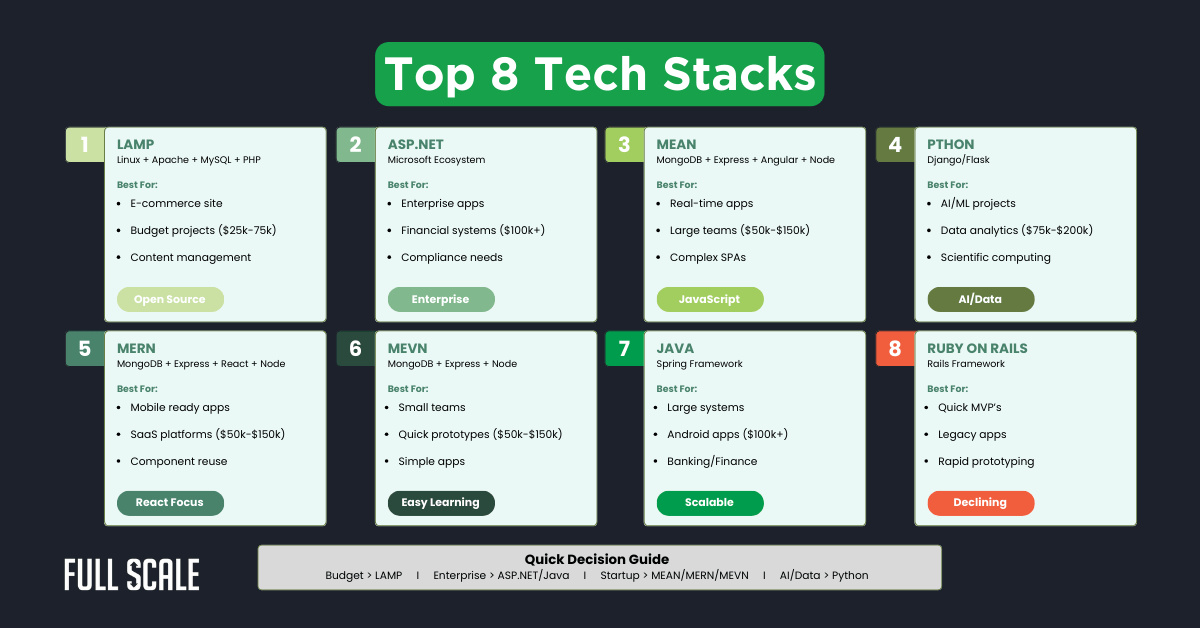
Tech stacks consist of tools and technologies used to build software applications. Different tech stacks suit different project needs. Some tech stacks are popular for their efficiency and ease of use. These stacks combine programming languages, frameworks, and databases to create powerful apps. Understanding popular tech stacks helps in choosing the right one for your project.
Mean And Mern Stacks
MEAN and MERN stacks use JavaScript for both front-end and back-end development. MEAN stands for MongoDB, Express.js, Angular, and Node.js. MERN replaces Angular with React. These stacks allow developers to write code in one language across the whole app. They offer fast development and easy maintenance.
Lamp Stack
LAMP stands for Linux, Apache, MySQL, and PHP. It is a classic tech stack for web development. This stack is reliable and widely supported. Linux serves as the operating system, Apache manages web requests, MySQL stores data, and PHP handles server-side scripting. LAMP suits simple to medium-sized projects well.
Serverless Architectures
Serverless architecture removes the need to manage servers. Developers write functions that run in the cloud when triggered. This model scales automatically and reduces infrastructure costs. Popular platforms include AWS Lambda, Azure Functions, and Google Cloud Functions. Serverless fits apps with variable workloads and fast deployment needs.
Choosing The Right Stack
Choosing the right tech stack is a vital decision for any project. It shapes how the project grows and performs. Picking a suitable stack reduces risks and speeds up development. A clear understanding of your needs and resources guides this choice.
Project Requirements
Start by listing what your project must do. Consider features, performance, and timeline. Some stacks fit simple projects better. Others handle complex tasks or heavy data. Match your tech stack to the project’s goals and challenges.
Team Expertise
Look at the skills your team already has. Using familiar tools saves time and cuts errors. Training on new technologies can slow progress. Choose a stack that fits your team’s experience. It helps keep the work smooth and efficient.
Scalability Needs
Think about how much your project will grow. Some stacks handle more users or data easily. Others need major changes to scale up. Pick technologies that can grow with your project. This avoids costly rewrites and downtime later.
Credit: mixpanel.com
Tools And Frameworks
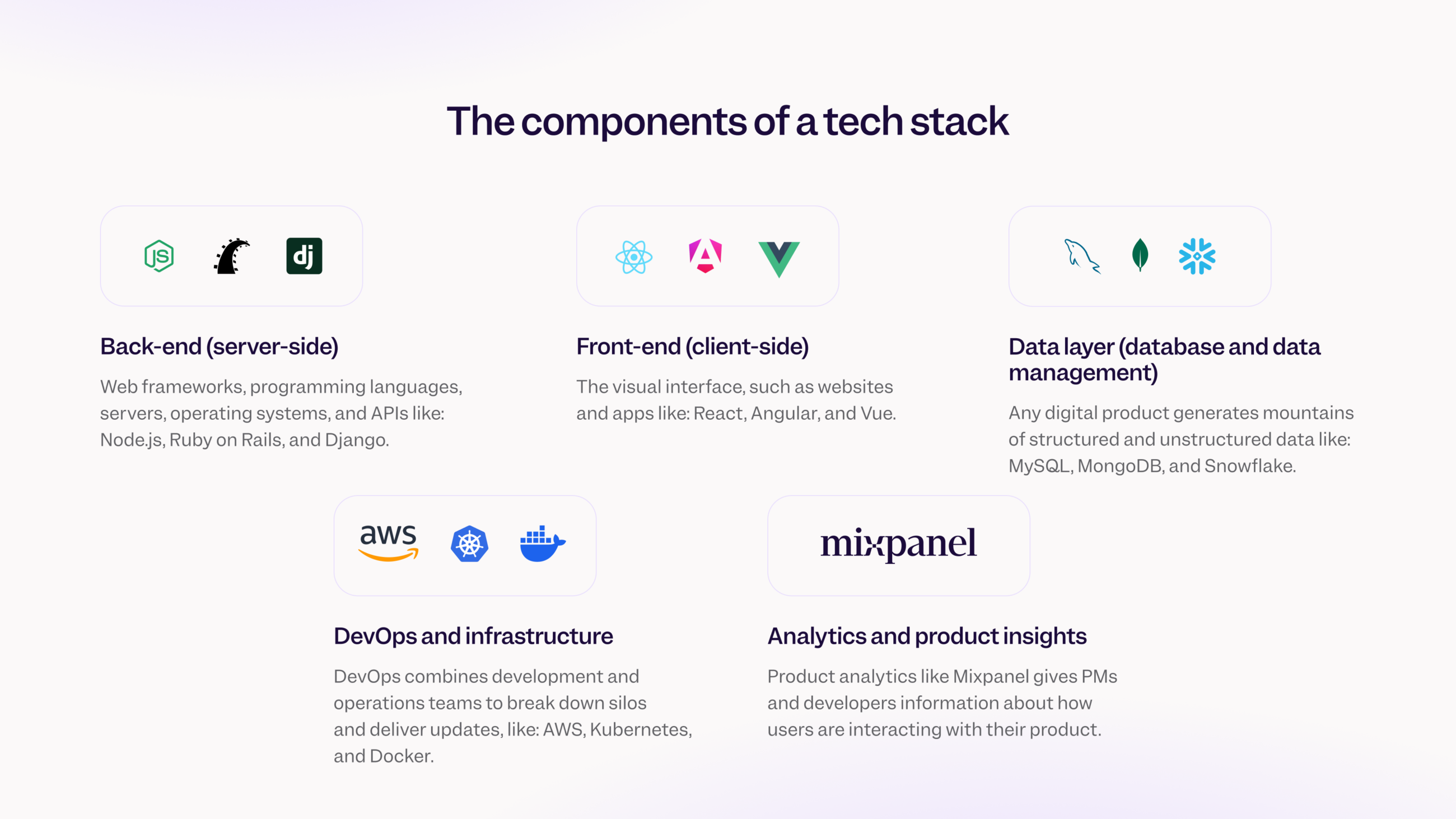
Choosing the right tools and frameworks shapes how a tech stack performs. These tools help build websites and apps faster and easier. They provide a foundation for developers to create features and manage data. Understanding common tools clarifies how tech stacks fit together.
Frontend Libraries
Frontend libraries control what users see and interact with. They make websites look good and respond quickly. Popular libraries include React, Vue, and Angular. These tools let developers build reusable components. This reduces time and effort in making user interfaces.
Backend Frameworks
Backend frameworks handle the server side of applications. They process data, manage users, and connect to databases. Common choices are Express, Django, and Ruby on Rails. These frameworks provide structure and tools to write clean code. They simplify tasks like routing, authentication, and API creation.
Database Solutions
Databases store and organize data for apps and websites. They keep user info, content, and settings safe and accessible. Popular databases include MySQL, MongoDB, and PostgreSQL. Each has strengths for different needs, like speed or flexibility. Choosing the right database supports efficient data management and scalability.
Cloud And Devops Integration
Cloud and DevOps integration plays a crucial role in modern tech stacks. It enables teams to deliver software faster and maintain it efficiently. This blend allows your applications to scale smoothly while keeping your infrastructure manageable.
Hosting Options
Choosing the right hosting option can make a big difference in your project’s success. Cloud providers like AWS, Google Cloud, and Azure offer various services tailored for different needs. You can pick from virtual machines, container services, or serverless architectures based on your app’s requirements.
Think about your app’s traffic and growth expectations. Will you need auto-scaling? How about global content delivery? Answering these questions helps narrow down hosting choices that fit your goals and budget.
Continuous Deployment
Continuous deployment keeps your code moving from development to production without delays. Tools like Jenkins, GitLab CI/CD, or GitHub Actions automate this process, reducing human error and speeding up releases.
Have you ever faced a release day full of last-minute bugs? Setting up continuous deployment helps catch issues earlier and lets you push updates confidently. It turns deployment into a routine task instead of a stressful event.
Monitoring And Maintenance
Once your app is live, monitoring ensures it runs smoothly and quickly spots problems. Services like Prometheus, New Relic, or Datadog provide real-time insights into performance and errors.
Regular maintenance is key to avoiding downtime and keeping users happy. Setting alerts and reviewing logs regularly can prevent small issues from becoming major headaches. What’s your plan for staying on top of your app’s health?
Credit: medium.com
Building Your Setup
Building your tech stack setup is more than just picking popular tools. It’s about creating a system that fits your project’s unique needs and grows with you. Every choice impacts how smoothly your development process will run and how easily you can adapt to changes.
Planning And Design
Start by defining what your project needs most. Are you focusing on speed, scalability, or ease of use? Write down the core functionalities and consider how each tool supports them.
Think about compatibility too. Will your front-end framework work well with your back-end language? How will your database handle future data growth? Planning ahead avoids costly rewrites later.
Ask yourself: What problems am I solving with this setup? This clarity helps you prioritize tools that truly add value instead of just following trends.
Development Workflow
Your workflow defines how your team collaborates and delivers code. Choose tools that simplify version control, code reviews, and deployment processes.
For example, integrating Git with a platform like GitHub or GitLab can streamline collaboration. Automate repetitive tasks using CI/CD pipelines to save time and reduce errors.
Think about how your setup supports quick feedback loops. Does it allow you to catch bugs early? Does it help maintain code quality? These factors directly affect your speed and efficiency.
Testing And Optimization
Testing is often overlooked but critical to a reliable product. Pick testing frameworks that fit your stack and automate as much as possible.
Load testing tools help you understand how your application performs under stress. This insight guides you in optimizing code and infrastructure.
Regularly review performance metrics and user feedback. How can you tweak your setup to make your app faster and more responsive? Continuous optimization keeps your product competitive.
Trends In Tech Stacks
Tech stacks evolve quickly as new tools and ideas emerge. Staying updated helps developers build faster and smarter apps. Trends shape how teams choose their tools and design software.
Microservices
Microservices break apps into small, independent parts. Each part handles one job. This design improves flexibility and speed. Teams can update one part without changing the whole app. It also helps scale parts that need more power.
Ai And Machine Learning
AI and machine learning add smart features to apps. They help analyze data and automate tasks. Many tech stacks now include AI tools and libraries. This trend makes apps more helpful and personalized.
Cross-platform Development
Cross-platform tools let developers build apps for many devices. One codebase works on phones, tablets, and computers. This saves time and money. Popular tools include React Native and Flutter. They help reach more users quickly.
Credit: fullscale.io
Frequently Asked Questions
What Is A Tech Stack In Software Development?
A tech stack is a combination of tools, programming languages, and frameworks used to build software. It includes front-end, back-end, and database technologies that work together to create applications efficiently.
Why Is Choosing The Right Tech Stack Important?
Choosing the right tech stack impacts development speed, scalability, and maintenance. It ensures compatibility, performance, and easier future updates, saving time and costs in software projects.
What Are Common Components Of A Tech Stack?
A tech stack usually includes front-end frameworks, back-end languages, databases, and server infrastructure. Popular examples are React for front-end, Node. js for back-end, and MongoDB for databases.
How Does A Tech Stack Affect App Performance?
A well-chosen tech stack optimizes app speed and responsiveness. It ensures smooth data handling, faster load times, and better user experience by using compatible and efficient technologies.
Conclusion
A tech stack builds the foundation of any software project. It combines tools and languages to make apps work. Choosing the right stack affects speed, cost, and future growth. Every developer uses a tech stack to solve problems. Understanding this helps you see how technology fits together.
It’s not just about code, but how parts connect. Now, you know what a tech stack means and why it matters.