What is Tech Stack: Ultimate Guide to Modern Development Tools
Have you ever wondered what powers your favorite apps and websites behind the scenes? The answer lies in something called a tech stack.
Understanding what a tech stack is can give you a clearer picture of how technology works and why some products perform better than others. Whether you’re building your own project or just curious about the digital world, knowing about tech stacks can make a big difference.
Keep reading, and you’ll discover how this simple concept plays a huge role in creating the technology you use every day.
Tech Stack Basics
Understanding the basics of a tech stack is essential if you want to build or manage any software project effectively. A tech stack is the combination of tools, programming languages, and frameworks used to create a digital product. Knowing what goes into a tech stack can help you make better decisions about your project’s structure and future growth.
Components Of A Tech Stack
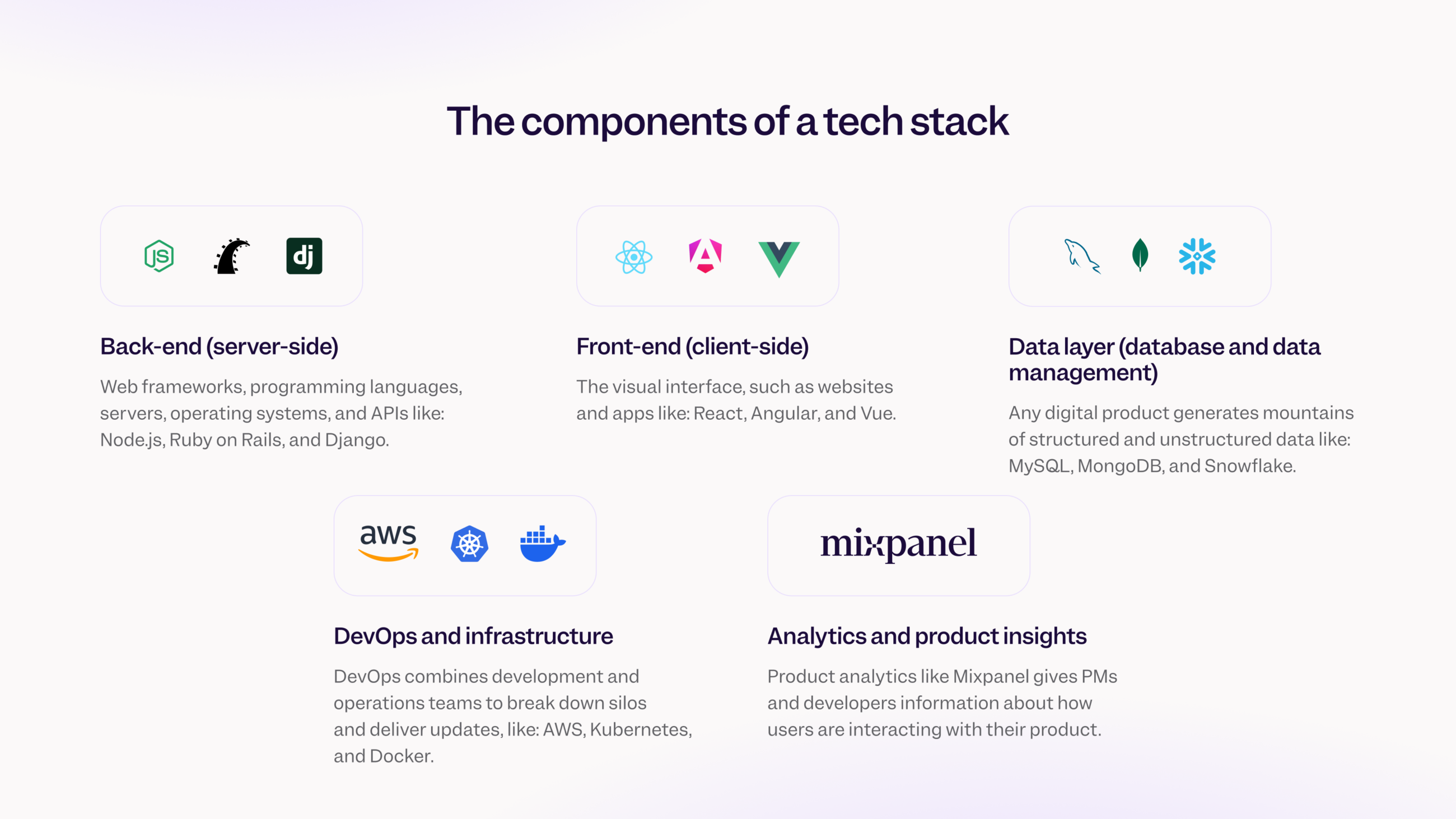
A tech stack usually consists of several key components working together. These include:
- Frontend:The part users interact with directly, like websites and apps.
- Backend:The server, database, and application logic behind the scenes.
- Database:Where all the data is stored and managed.
- DevOps tools:For deployment, monitoring, and maintaining the application.
Each piece plays a crucial role. If one fails, the whole system might not work as expected. Have you ever wondered why some websites feel slow or buggy? It’s often a tech stack issue.
Frontend Vs Backend
The frontend is everything you see and click on a website or app. It involves languages like HTML, CSS, and JavaScript. Your experience depends heavily on how well the frontend is built.
The backend is the engine powering the frontend. It handles data, user authentication, and business logic. Languages like Python, Ruby, and Java are common here. Without a strong backend, your app can’t handle real-world tasks efficiently.
Think about your favorite app. How smooth is the interface? That’s frontend. How quickly it loads data or processes requests? That’s backend at work.
Full Stack Development
Full stack development means working on both frontend and backend parts of an application. This gives you the flexibility to build entire projects on your own or understand the full system better.
Many startups prefer full stack developers because they can cover more ground. However, it requires a broad skill set and constant learning. Are you ready to master both sides and see the bigger picture?
Knowing full stack development can make you more valuable in the job market. It also helps you communicate better with teams working on different layers of a project.
Popular Frontend Technologies
Popular frontend technologies shape how users experience websites and apps. They allow you to build interactive, visually appealing, and fast interfaces. Choosing the right tools can make your development smoother and your final product more engaging.
Javascript Frameworks
JavaScript frameworks help you write organized and reusable code. React, Vue, and Angular are some of the top choices.
- Reactfocuses on building user interfaces with components. It’s flexible and widely supported.
- Vueis beginner-friendly and easy to integrate into projects of any size.
- Angularoffers a full-featured framework with built-in tools for complex apps.
Have you tried building a project with one of these? You’ll notice how they speed up your work and improve maintainability.
Css Tools And Libraries
CSS tools make styling easier and more consistent. Libraries like Bootstrap, Tailwind CSS, and Sass are popular options.
- Bootstrapprovides ready-made components and responsive design out of the box.
- Tailwind CSSuses utility classes to build custom designs quickly without writing a lot of CSS.
- Sassadds features like variables and nesting to standard CSS, making stylesheets cleaner.
Using these tools can save you hours of styling time. What’s your current approach to CSS? Could one of these speed things up?
Frontend Build Tools
Build tools automate tasks like bundling, minifying, and live-reloading during development. Webpack, Vite, and Parcel are widely used.
- Webpackis highly configurable and works well for complex projects.
- Viteoffers fast startup and hot module replacement, boosting your development speed.
- Parcelrequires minimal configuration, making it beginner-friendly.
Choosing the right build tool can improve your workflow significantly. How much time do you spend waiting for your project to compile? These tools can reduce that wait.
Backend Technologies
Backend technologies form the backbone of any modern application. They handle data processing, storage, and communication behind the scenes, ensuring your app runs smoothly and efficiently. Understanding these components can help you make better choices for your projects and improve performance.
Server-side Languages
Server-side languages power the logic of your application. Popular options include JavaScript (Node.js), Python, Ruby, Java, and PHP. Each language has its strengths—Node.js excels in real-time applications, while Python is known for simplicity and versatility.
Think about what your app needs: speed, scalability, or ease of development? Choosing the right language impacts how quickly you can build and maintain your backend. Personally, I’ve found starting with Node.js makes prototyping faster, but switching to Python helped scale the project better.
Databases And Storage
Your backend needs a place to store data reliably. Databases come in two main types: relational (SQL)and non-relational (NoSQL). SQL databases like MySQLand PostgreSQLare great for structured data with complex relationships.
NoSQL options such as MongoDBor Redishandle unstructured or rapidly changing data well. Choosing between them depends on your data’s nature and how you plan to access it. Have you considered how your data grows over time? This affects your storage and backup strategies.
Api And Microservices
APIs act as bridges that allow different parts of your system or external services to communicate. REST and GraphQL are common API styles, each with unique benefits. Microservices break your backend into smaller, independent pieces, making it easier to update or scale parts without affecting the whole system.
Have you ever struggled with a monolithic app where one change causes unexpected issues? Microservices can reduce that risk by isolating functionality. However, they add complexity in managing communication between services, so weigh the pros and cons for your project.
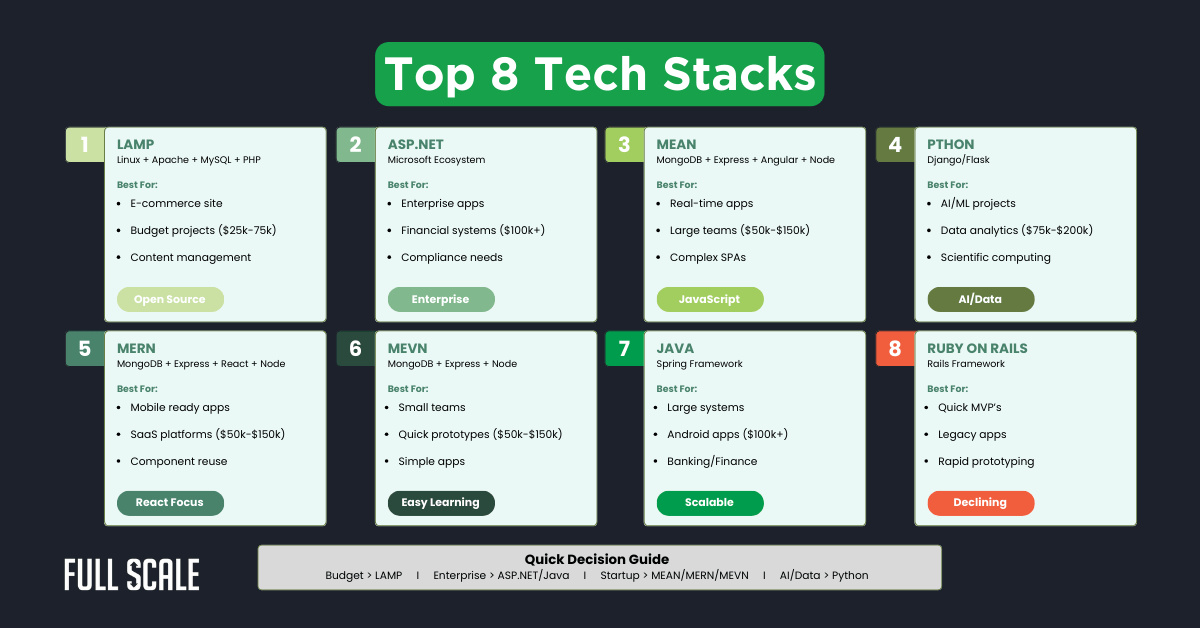
Credit: fullscale.io
Devops And Deployment Tools
DevOps and deployment tools form the backbone of modern software development. They help you deliver updates faster and maintain system reliability. Understanding these tools can improve how you manage your tech stack and streamline your workflow.
Continuous Integration
Continuous Integration (CI) means automatically testing and merging code changes as soon as they are made. This reduces errors and speeds up development cycles. Tools like Jenkins and GitLab CI help you catch bugs early, so your software stays stable.
Have you ever faced a last-minute bug that broke your entire build? CI helps you avoid that by running tests continuously, making your work smoother and less stressful.
Containerization
Containerization packages your app and its dependencies into a single unit that runs consistently anywhere. Docker is the most popular tool for this. It allows you to move applications between environments without worrying about setup differences.
This means you can develop on your laptop and deploy on the cloud without surprises. Containers also make scaling easier, helping your app handle more users without extra hassle.
Cloud Platforms
Cloud platforms like AWS, Azure, and Google Cloud provide the infrastructure to deploy and manage your applications remotely. They offer services ranging from virtual servers to databases and AI tools.
Using cloud platforms means you can focus on building features instead of managing hardware. Have you thought about how shifting to the cloud could reduce your maintenance headaches and costs?
Choosing The Right Tech Stack
Choosing the right tech stack is crucial for any software project. It shapes how the product performs and grows. The right tools save time and reduce costs. The wrong choice can cause delays and extra work. Consider these key points to make a smart decision.
Project Requirements
Understand what your project needs. Define the features and functions clearly. Know the type of application: web, mobile, or desktop. Identify performance needs like speed and security. Check if the project needs third-party integrations or specific databases. This helps narrow down the best technologies to use.
Team Expertise
Look at your team’s skills and experience. Choose technologies your team knows well. New or complex tools may slow development. Training costs and time can be high. Use familiar languages and frameworks to keep the project smooth. Consider hiring experts if a new tech stack is necessary.
Scalability And Maintenance
Plan for the future growth of your project. Choose a tech stack that can handle more users and data. Easy maintenance is important for long-term success. Select tools with strong community support and regular updates. This reduces bugs and security risks. Good documentation helps your team fix problems faster.
Credit: medium.com
Trends In Modern Development
Modern development sees constant change in tools and methods. Developers adopt new tech to build faster and smarter. Trends focus on reducing complexity and boosting efficiency. These trends shape how tech stacks evolve in projects today.
Serverless Architecture
Serverless architecture lets developers write code without managing servers. Cloud providers handle all infrastructure tasks automatically. This approach cuts costs and scales applications easily. Developers can focus only on core logic and features.
It supports quick deployment and reduces downtime. This model fits well for apps needing variable usage. Many companies choose serverless to improve speed and reliability.
Low-code And No-code Tools
Low-code and no-code tools simplify app building. They use visual interfaces and drag-and-drop features. These tools allow non-developers to create software quickly. Teams save time by avoiding complex coding steps.
They speed up prototyping and reduce errors. Small businesses benefit from these tools to launch products fast. Low-code platforms integrate well with existing tech stacks.
Ai And Automation
Artificial intelligence and automation streamline many development tasks. AI helps with code suggestions, bug detection, and testing. Automation manages repetitive work like deployments and updates.
This reduces human error and accelerates project timelines. Developers spend more time on creative problem-solving. AI-driven tools continue to improve software quality and efficiency.
Credit: mixpanel.com
Frequently Asked Questions
What Is A Tech Stack?
A tech stack is a combination of technologies used to build software applications. It includes programming languages, frameworks, libraries, servers, and tools. These components work together to create efficient, scalable solutions. Choosing the right tech stack depends on project requirements, team expertise, and desired functionality.
Why Is A Tech Stack Important?
A tech stack is crucial for software development efficiency and scalability. It determines the application’s performance, reliability, and maintainability. The right stack can reduce development time and costs. It ensures compatibility and optimizes resource usage, ultimately impacting the project’s success and long-term viability.
How Do I Choose A Tech Stack?
Choosing a tech stack involves assessing project requirements, budget, and team skills. Consider the application’s scalability, security, and performance needs. Research popular technologies and their community support. Evaluate compatibility with existing systems. Balance innovation with stability for a reliable, future-proof solution.
What Are Common Tech Stack Components?
Common tech stack components include frontend technologies like HTML, CSS, and JavaScript frameworks. Backend components involve server-side languages like Python, Ruby, or Java. Databases, cloud services, and development tools complete the stack. Each component plays a vital role in creating efficient, scalable applications.
Conclusion
A tech stack shapes how software works and grows. Choosing the right tools helps build strong, fast apps. It fits your project’s needs and team skills. Knowing what a tech stack means makes decisions clear. This knowledge helps you work better with developers.
Tech stacks are key to smart, smooth software projects. Keep learning about them to stay confident and ready.